Module 19 — Agent loops¶
Question this module answers: How do we make the model pursue goals?
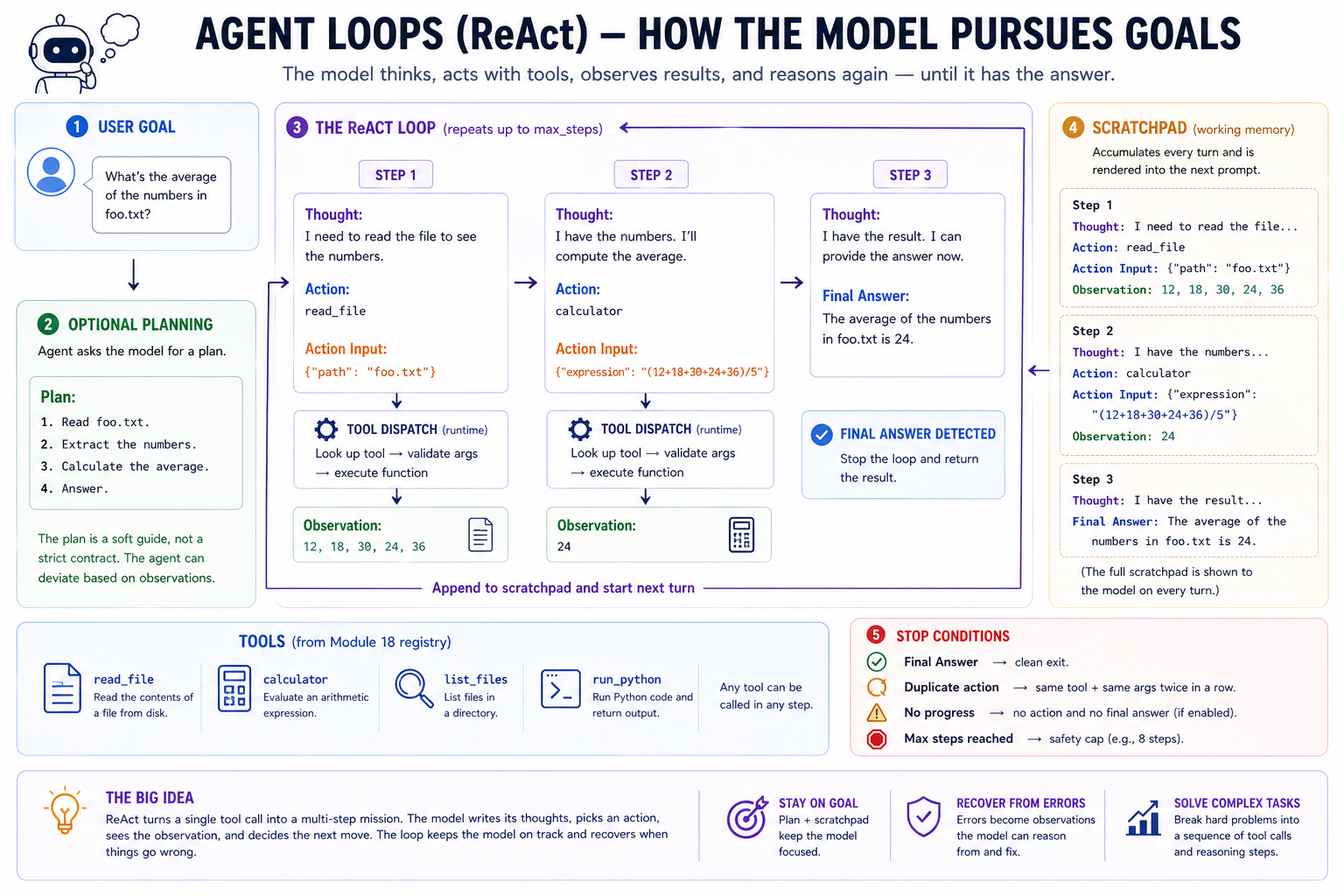
The agent loop is a thin wrapper around tool dispatch: it adds explicit reasoning, persistent memory (the scratchpad), an optional plan, smarter stop conditions, and graceful recovery from tool errors. The model still does all the cognitive work; the agent loop just keeps it on rails.
Before you start¶
- Finish
g2c/toolsfrom 18-tools — the agent dispatches throughdispatch_tool_call, reusing the registry, schema validation, and error wrapping - Finish
g2c/inferencefrom 16-inference — the agent callsbackend.complete(...)for every reasoning step - Configure ProdLM with
./prodlm.sh qwen3.5:4bor another local instruction model — the default live path needs a model that can follow ReAct-style formatting - Refresh JSON request/response patterns — tool inputs and tool results are structured data even when the model emits them as text
- Refresh basic regular expressions — the parser extracts line-oriented markers from free-form model completions
Where this fits in¶
Module 16 gave us a stable model backend. Module 17 added retrieval. Module 18 gave the model tools. Now we need the runtime pattern that lets the model pursue a goal across several calls, observe what happened, recover from mistakes, and eventually stop.
Introducing tools fixed the "model needs to call a function" problem. But many real tasks need a sequence of calls, where each call depends on what the last one revealed:
   ┌───────────────────────────────────────────────────────────────────────┐
   │  TASKS THAT NEED MORE THAN ONE TOOL CALL                              │
   ├───────────────────────────────────────────────────────────────────────┤
   │                                                                       │
   │   • "Summarize the longest file in this directory":                   │
   │       1. list files                                                   │
   │       2. read each, find the longest                                  │
   │       3. read that one fully                                          │
   │       4. write the summary                                            │
   │                                                                       │
   │   • "What's the average of the numbers in foo.txt?":                  │
   │       1. read foo.txt                                                 │
   │       2. parse numbers                                                │
   │       3. compute average                                              │
   │                                                                       │
   │   • "Find a Python error in this snippet":                            │
   │       1. read the file                                                │
   │       2. run it                                                       │
   │       3. read the error                                               │
   │       4. propose a fix                                                │
   │                                                                       │
   │                                                                       │
   └───────────────────────────────────────────────────────────────────────┘
The tool loop from Module 18 can keep calling tools, but it does not give the model an explicit place to reason between calls. The model has to choose the next action directly from the running transcript.
A key insight we gained last week is that while inference itself is inherently stateless, we can simulate "memory" between successive calls by including the previous interactions in the prompt of the next interaction. We used that paradigm to interact with external tools. But in this lesson we'll learn how that framework extends to support thinking, planning, and goal-directed multi-step action.
In this lesson, we are now past the point where we focus on improving the model itself. Instead, we are now in the realm of prompt engineering, where we make the same models smarter with intelligently structured prompts.
The big idea¶
An agent is a goal-directed inference loop. It calls a model, interprets the model's output, optionally takes an action in the outside world, records what happened, and calls the model again with that record included in the next prompt.
The agent harness is the deterministic software that runs this loop. The model still does ordinary inference. The harness gives that inference a structure: memory through an accumulated transcript, actions through tools, and stop conditions so the loop can finish or fail closed.
The transcript is the full record of one run. In this module, the part of the transcript rendered into each prompt has two pieces. The initial prompt context contains system instructions, tool descriptions, the user's goal, and sometimes an optional plan. The scratchpad is the part that grows: the model's thoughts, requested actions, action inputs, and tool observations. The full prompt for each model call is rebuilt from both pieces:
That final Thought: is the cue for the next step. It tells the model to continue in the format the harness knows how to parse.
No new math, no training, no changes to the underlying model. Just a structured runtime around repeated model calls that gives the model memory, tools, and control flow for complex tasks.
ReAct¶
The pattern we build in this module is ReAct, short for reasoning + acting. Instead of asking the model to jump directly from a user request to a final answer, ReAct asks the model to alternate between deciding what to do next and taking an action.
A tool-using ReAct step has four fields:
Thought: I need to inspect the file before answering.
Action: read_file
Action Input: {"path": "numbers.txt"}
Observation: 3
7
10
20
The model writes Thought, Action, and Action Input. The runtime executes the action and appends Observation. Then the next model call sees the updated scratchpad.
This is powerful because many useful tasks cannot be solved in one model call. The model may need to read a file, run a calculation, inspect an error, search a document, or recover from a bad tool call. ReAct gives the model a structured place to reason between those steps.
A ReAct run ends when the model stops acting and emits a final answer:
A key empirical finding from the ReAct paper is that models do better on multi-step tool-use tasks when reasoning and action are separated. The Thought line gives the model a place to commit to why it is about to call a tool. Without that separation, models often conflate reasoning and action, and tool selection gets noisy.
In simplified pseudocode:
plan = maybe_make_plan(user_goal, tools)
prompt_context = build_prompt_context(user_goal, tools, plan)
scratchpad = []

for step in range(max_steps):
    prompt = render(prompt_context, scratchpad) + "\nThought:"
    model_output = model(prompt)
    parsed = parse_react_step(model_output)

    if parsed.final_answer is not None:
        return parsed.final_answer

    observation = run_tool(parsed.action)
    scratchpad.append(parsed.thought, parsed.action, observation)

return stopped_without_answer
Each piece is small. The parser extracts structure from model text. The tool dispatcher turns actions into observations. The scratchpad records the working trace. Stop conditions prevent the loop from running forever.
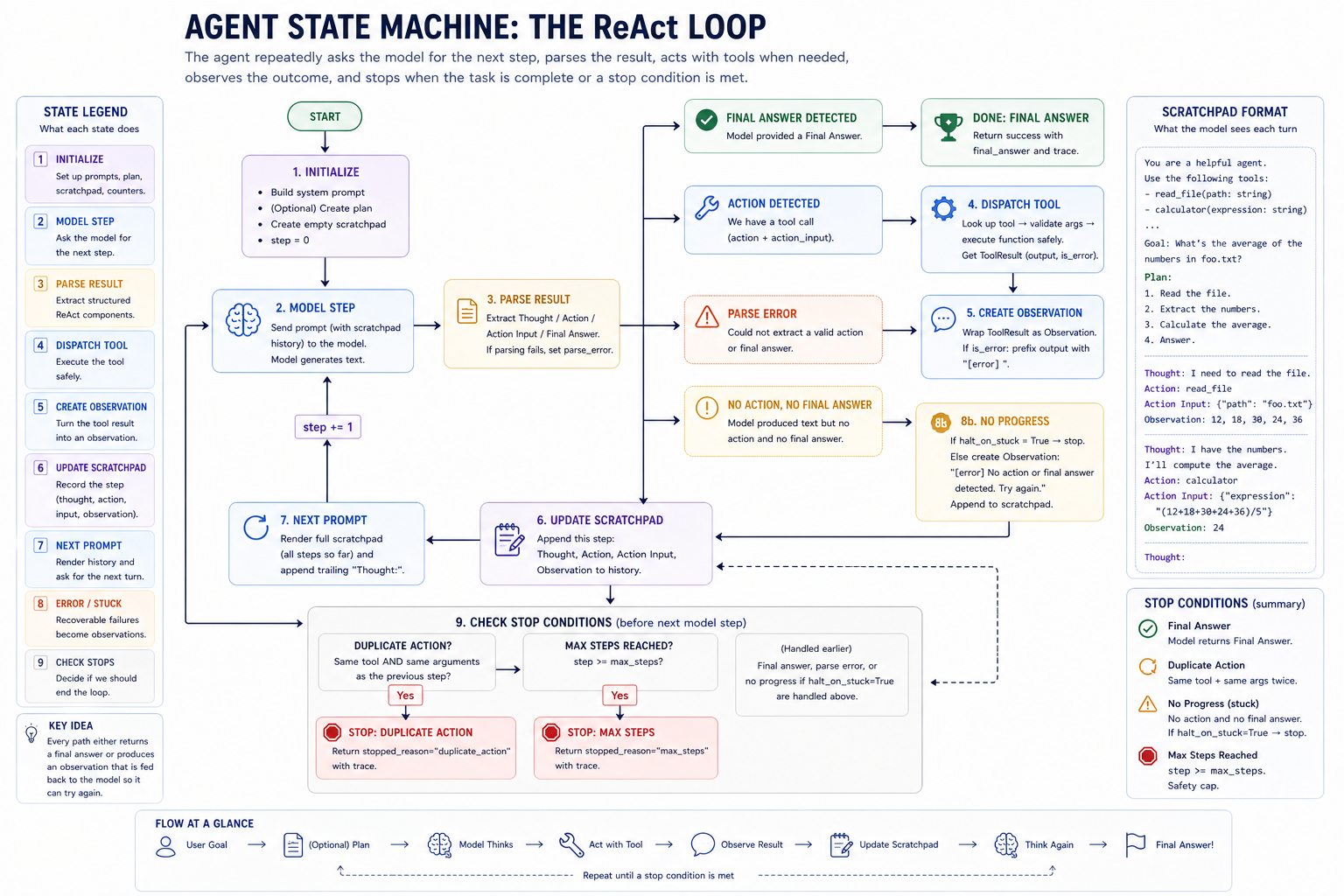 The control-flow picture for
 Agent.run: model output is parsed, actions are dispatched, observations go into the scratchpad, and the next prompt is rebuilt from that state.
One ReAct step¶
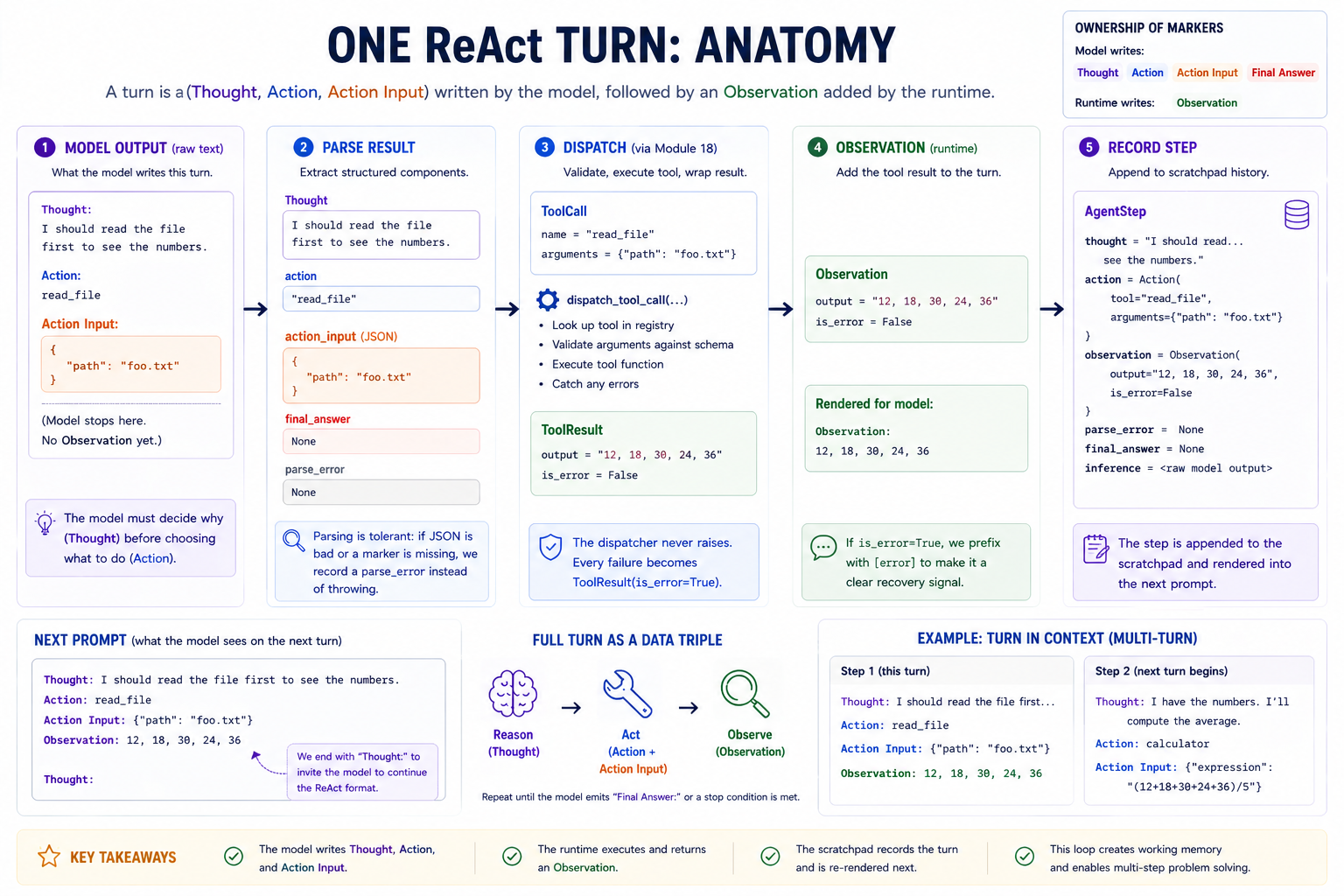 Inside one iteration of the loop.
   ┌──────────────────────────────────────────────────────────────────────┐
   │   ONE REACT STEP                                                     │
   ├──────────────────────────────────────────────────────────────────────┤
   │                                                                      │
   │     model emits:                                                     │
   │         Thought: I need to add 21 and 21 to get the answer.          │
   │         Action: calculator                                           │
   │         Action Input: {"expression": "21 + 21"}                      │
   │                                                                      │
   │     parser extracts:                                                 │
   │         thought  = "I need to add 21 and 21 to get the answer."      │
   │         action   = Action(tool="calculator",                         │
   │                           arguments={"expression": "21 + 21"})       │
   │                                                                      │
   │     dispatcher (Module 18) executes:                                 │
   │         result = ToolResult(output="42", is_error=False)             │
   │                                                                      │
   │     agent records:                                                   │
   │         observation = Observation(output="42", is_error=False)       │
   │         AgentStep(thought, action, observation, ...)                 │
   │                                                                      │
   │     scratchpad renders for next step:                                │
   │         Thought: I need to add 21 and 21 to get the answer.          │
   │         Action: calculator                                           │
   │         Action Input: {"expression": "21 + 21"}                      │
   │         Observation: 42                                              │
   │                                                                      │
   └──────────────────────────────────────────────────────────────────────┘
The model sees prior Thought / Action / Action Input / Observation blocks on every subsequent step. It gets to read its own working history and decide what to do next. This is the scratchpad's job: turn stateless complete(prompt) calls into a stateful loop.
The scratchpad¶
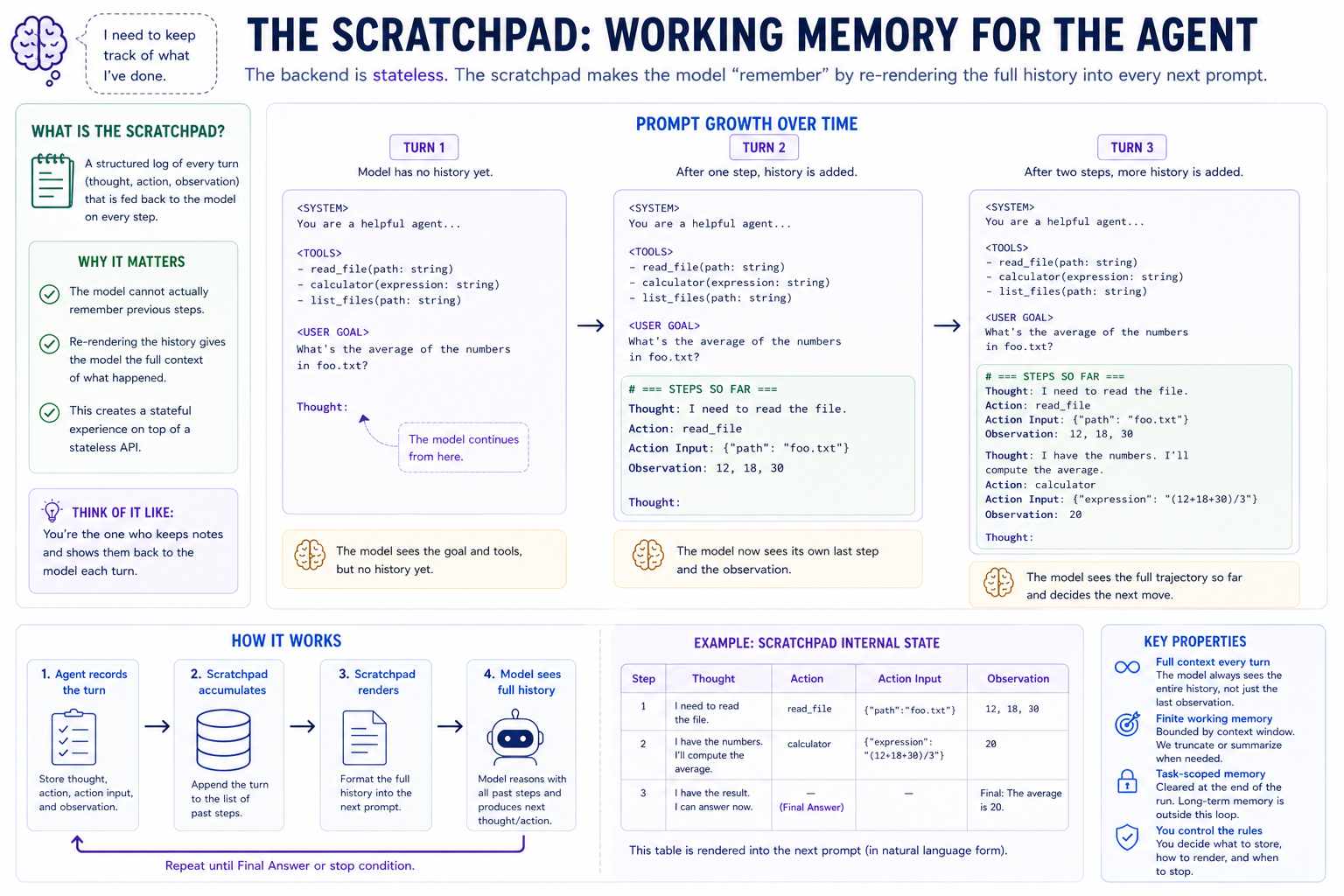 Each prompt is built from stable prompt context plus the growing scratchpad.
   ┌──────────────────────────────────────────────────────────────────────┐
   │   PROMPT GROWTH — STEP BY STEP                                       │
   ├──────────────────────────────────────────────────────────────────────┤
   │                                                                      │
   │   Step 1 prompt:                                                     │
   │       <system>                                                       │
   │       <tools>                                                        │
   │       <plan, optional>                                               │
   │       Question: <user msg>                                           │
   │       Thought:                  ← model continues from here          │
   │                                                                      │
   │   Step 2 prompt (step 1's work trace now visible):                   │
   │       <system>                                                       │
   │       <tools>                                                        │
   │       <plan, optional>                                               │
   │       Question: <user msg>                                           │
   │                                                                      │
   │       Thought: <step 1 thought>                                      │
   │       Action: <step 1 action.tool>                                   │
   │       Action Input: <step 1 action.arguments>                        │
   │       Observation: <step 1 observation>                              │
   │                                                                      │
   │       Thought:                  ← model continues from here          │
   │                                                                      │
   │   Step 3 prompt (step 1 + step 2 visible):                           │
   │       ...                                                            │
   │       <step 1 block>                                                 │
   │                                                                      │
   │       <step 2 block>                                                 │
   │                                                                      │
   │       Thought:                  ← model continues from here          │
   │                                                                      │
   └──────────────────────────────────────────────────────────────────────┘
The prompt context is mostly stable: system instructions, tool descriptions, the user's goal, and maybe a plan. The scratchpad is the part that grows: one block per ReAct step. The broader transcript is the full record of the run, but the scratchpad is the specific working section the agent renders back into the next prompt.
This append-only layout also matters for efficient inference. With a KV cache, the model can reuse the cached keys and values for the unchanged prefix of the prompt and only compute the newly appended tokens. That works best when each step preserves the previous prompt exactly and appends the new scratchpad block at the end. If the harness rewrites earlier text, reorders blocks, or edits old observations, the cached prefix no longer matches and the backend has to recompute more of the prompt.
The marker contract¶
ReAct's text protocol has five named markers:
Thought:        # reasoning text, written by the model
Action:         # tool name, written by the model
Action Input:   # JSON object, written by the model
Observation:    # tool result, injected by the runtime
Final Answer:   # user-facing answer, written by the model
For a tool step, the model emits Thought, Action, and Action Input. The runtime appends Observation and asks for the next step. When the model has enough information, it emits Thought and Final Answer, and the loop exits.
Why these markers and not, say, <thought>...</thought> XML?
- It is the canonical ReAct format. Yao et al. introduced these markers, and many instruction-tuned models have seen them.
- It is easy to parse. Each marker is a fixed string at line start.
- It separates reasoning from action. The parser can extract the tool call without treating the free-form thought as structured data.
Errors are observations, not crashes¶
   ┌──────────────────────────────────────────────────────────────────────┐
   │  WHAT HAPPENS WHEN A TOOL CALL GOES WRONG                            │
   ├──────────────────────────────────────────────────────────────────────┤
   │                                                                      │
   │   Model emits:                                                       │
   │       Action: nonexistent_tool                                       │
   │       Action Input: {"x": "y"}                                       │
   │                                                                      │
   │   Module 18's dispatch_tool_call returns:                            │
   │       ToolResult(output="no tool named 'nonexistent_tool'; ...",     │
   │                  is_error=True)                                      │
   │                                                                      │
   │   The agent wraps:                                                   │
   │       Observation(output="no tool named ...", is_error=True)         │
   │                                                                      │
   │   The scratchpad renders for the next step:                          │
   │       Thought: <model's thought>                                     │
   │       Action: nonexistent_tool                                       │
   │       Action Input: {"x": "y"}                                       │
   │       Observation: [error] no tool named 'nonexistent_tool'; ...     │
   │                          ^^^^^^^                                     │
   │                          this prefix is the recovery signal          │
   │                                                                      │
   │   Model sees its own bad action followed by [error] ..., decides     │
   │   what to do differently, and emits the corrected action on the      │
   │   next step. No stack trace. No loop crash. No lost conversation.    │
   │                                                                      │
   └──────────────────────────────────────────────────────────────────────┘
The dispatcher from Module 18 wraps tool failures as ToolResult(is_error=True). The agent converts that into Observation(is_error=True) and renders it with an [error] prefix. The loop does not crash just because the model chose a bad tool or malformed argument. It feeds the error back to the model as information.
Stop conditions, layered¶
   ┌──────────────────────────────────────────────────────────────────────┐
   │  STOP CONDITION TABLE                                                │
   ├──────────────────────────────────────────────────────────────────────┤
   │                                                                      │
   │   stopped_reason   when it fires           what it means             │
   │   ──────────────   ─────────────────       ────────────────────────  │
   │   final_answer     model emitted Final     clean exit, model is done │
   │                    Answer                                            │
   │                                                                      │
   │   duplicate_       same action + same      model didn't understand   │
   │     action         args two steps in a     its last observation, is  │
   │                    row, with               looping. Stop.            │
   │                    loop_detection=True                               │
   │                                                                      │
   │   no_progress      neither action nor      model emitted prose with  │
   │                    final answer, with      no structured content.    │
   │                    halt_on_stuck=True      Halt rather than retry.   │
   │                                                                      │
   │   max_steps        loop ran out of         the safety net. Returns   │
   │                    iterations              final_answer=None — the   │
   │                                            model never decided to    │
   │                                            stop. Tune max_steps for  │
   │                                            the task.                 │
   │                                                                      │
   └──────────────────────────────────────────────────────────────────────┘
The default Agent has loop_detection=True, halt_on_stuck=False, max_steps=8. That combination handles:
- Clean tasks: model emits Final Answer in 1-3 steps. ✓
- Tasks with a tool error: model recovers (the [error] observation feeds back). ✓
- Tasks where the model loops: loop_detection cuts it off. ✓
- Tasks where the model goes off-format: parse-error observation feeds back; it usually recovers. ✓
- Truly bad situations: max_steps cuts off after 8 steps. ✓
Tuning these per-task is a real consideration — loop_detection=False for legitimate-retry workflows; halt_on_stuck=True when the model has only one shot at format compliance; smaller / larger max_steps for one-shot vs. long-task agents.
Concepts to internalize¶
-
A turn is a triple, not an utterance. The model's per-turn output isn't free-form text; it's structurally
(thought, action OR final_answer). The parser's job is to extract that structure; the loop's job is to feed it back. Treating the model as a structured-output device is what makes everything work. -
The scratchpad turns stateless inference into state. Each backend.complete is a memoryless function call. The scratchpad makes the model appear to remember by re-rendering history into every subsequent prompt. The model isn't actually remembering; the prompt is.
-
Errors are part of the conversation. Module 18's "errors as data" extends to multi-step: the agent's loop survives model wobble (bad parse, unknown tool, bad args, runtime exception) and feeds it back as the next turn's observation. After a few attempts, confused models often find their way to a working answer because the errors are conversational, not crashes.
-
Planning is a soft prior, not a hard contract. The Plan is rendered into the prompt and helps the model stay on track, but the model is free to deviate. The plan is most useful for tasks with obvious structure ("read X, transform Y, write Z"); least useful for tasks where the model just needs to call one tool.
-
Loop detection is a heuristic, but a useful one. Same tool + same args two steps in a row catches the most common loop pattern (model didn't understand the observation, retries identical call). It's not a proof of looping; the flag exists so you can opt out for legitimate-retry tasks.
-
The trailing
Thought:nudge is load-bearing. Without it, instruction-tuned models often start the next turn with prose ("I think we should..."), which the parser tolerates but which costs tokens and accuracy. The_build_prompthelper appends\n\nThought:after the scratchpad; this is what keeps the model in format. -
max_stepsexists because models can lose the thread. The combination of "nothing in the prompt actually requires the model to stop" and "context length is finite" means you need a hard cap. Module 18 hadmax_steps=5; Module 19 defaults to8because a planned task often needs the planning step + 3-5 tool calls + the final answer. Tune per-task.
Two channels for agent communication¶
This module's main lesson is the ReAct text channel: the model emits Thought: / Action: / Action Input: / Final Answer: as plain text, a regex parser extracts the structure, and the loop feeds observations back into the next prompt. This is the historical agent format (Yao et al. 2022) and what every early LangChain example used.
The same loop also exists in the structured tool-calling channel — the modern alternative that OpenAI shipped in mid-2023 and every major provider has adopted. Same observe → act → observe loop; same Action / Observation / AgentStep data shapes; same loop control and planner. What changes is I/O at the model boundary:
| ReAct (text) | Structured (native) | |
|---|---|---|
| Wire format | Thought: / Action: / Action Input: markers |
{"role": "assistant", "tool_calls": [...]} JSON |
| Parser | regex (parse_react_step) |
trivial JSON read |
| Reasoning slot | required Thought: line per turn |
optional content alongside tool_calls |
| Multi-tool/turn | one Action per Thought | tool_calls: [...] array; parallel calls supported |
| Where the model learned it | mostly pretraining (LangChain docs, ReAct papers) | post-training (function-calling fine-tunes) |
| Failure mode on small models | parse fragility, format wobble | mostly avoids both |
g2c/agent/native.py provides NativeAgent — the same loop wrapped around chat_with_tools instead of complete. Two small functions (_history_to_messages, _chat_to_step) are the entire mechanical difference: one wraps the agent's step history into an OpenAI/Ollama-style messages list, the other unwraps the model's structured response back into an AgentStep. Everything else — planner, scratchpad, loop_detection, max_steps, AgentResult shape — is shared.
Why teach ReAct if structured won? Because the parser, the scratchpad rendering, and the loop are what's buildable and generalizable. JSON-structured tool calling is one json.loads() and the lesson is shallow. ReAct exposes the regex parsing, format-tolerance, recovery-from-parse-failure mechanics that every agent framework had to figure out before OpenAI standardized the protocol. The native channel is then a one-page demonstration of how the same loop works once the format is structured for you.
The practical takeaway from running the same task on both channels (Exercise 12b in the notebook) is that format choices propagate into model capabilities: a small model trained on the structured format will outperform itself on ReAct, not because ReAct is harder in principle but because the model has seen fewer examples of it during post-training. Format is where model training meets the wire.
What we don't cover¶
- Tree-of-thoughts, reflection loops, async/parallel agents, streaming parsers, and supervisor-worker systems.
- Production sandboxing. All Module 18 caveats still apply: the local
run_pythontool is pedagogical, not a hosted-agent sandbox. - Token-aware context management and long-term memory. Module 19 uses a simple scratchpad; Module 20 layers on conversation-level assistant behavior.
What you'll build¶
Package: g2c/agent/
# base.py
@dataclass(frozen=True)
class Action:                                                     # implemented
    tool: str
    arguments: dict[str, Any]

@dataclass(frozen=True)
class Observation:                                                # implemented
    output: str
    is_error: bool = False

class AgentError(Exception): ...                                  # implemented

@dataclass
class Plan:                                                       # implemented
    goal: str
    steps: list[str] = field(default_factory=list)

@dataclass
class AgentStep:                                                  # implemented
    completion: str
    thought: str
    action: Action | None
    observation: Observation | None
    final_answer: str | None
    parse_error: str | None
    inference: InferenceResult
    # + .final() / .act() / .stuck() named constructors that fill the
    #   mechanical fields, so _decide_step reads as policy, not plumbing.

@dataclass
class AgentRunResult:                                             # implemented
    user_message: str
    plan: Plan | None
    final_answer: str | None
    steps: list[AgentStep]
    stopped_reason: str
    metadata: dict[str, Any] = field(default_factory=dict)

@dataclass(frozen=True)
class StepOutcome:                                                # implemented
    step: AgentStep                  # the record for one turn
    stop_reason: str | None = None   # set -> the driver stops the loop
    remember: bool = True            # append step to the scratchpad?


# parser.py
@dataclass(frozen=True)
class ParsedStep:                                                 # implemented
    thought: str
    action: Action | None
    final_answer: str | None
    parse_error: str | None

def parse_react_step(text) -> ParsedStep: ...                     # SCAFFOLDED


# memory.py
class Scratchpad:                                                 # implemented
    def __init__(self, *, max_chars=None): ...
    def append(self, step) -> None: ...
    def steps(self) -> list[AgentStep]: ...
    def render(self) -> str: ...                                  # SCAFFOLDED

# planner.py
def extract_plan(text, user_message) -> Plan | None:              # SCAFFOLDED
    ...

def make_plan(backend, user_message, registry, **kw)
    -> Plan | None: ...                                           # implemented


# prompts.py
def render_system_prompt(tools) -> str: ...                       # implemented
def render_planning_prompt(user_message, tools) -> str: ...       # implemented
def render_plan_block(goal, steps) -> str: ...                    # implemented


# agent.py
class Agent:
    def __init__(self, backend, registry, *,                      # implemented
                 max_steps=8, plan=True, loop_detection=True,
                 halt_on_stuck=False, scratchpad_max_chars=None,
                 max_new_tokens=512, temperature=0.2,
                 top_k=None, top_p=None): ...

    def _build_prompt(self, user_message, plan, scratchpad)
        -> str: ...                                               # implemented

    # The loop is PROVIDED — the same bounded driver you built in
    # Module 18 (run_with_tools). run() validates + plans, then hands
    # off to _run_loop, which calls your _decide_step once per turn.
    def run(self, user_message) -> AgentRunResult: ...            # implemented
    def _run_loop(self, user_message, plan, scratchpad): ...      # implemented
    def _observe(self, action, step_index) -> Observation: ...    # implemented

    # The policy is YOURS — the whole Module-19 deliverable. Classify
    # one parsed step, dispatch a tool if needed, return a StepOutcome
    # telling the driver whether to remember it and whether to stop.
    def _decide_step(self, parsed, inference, steps)              # SCAFFOLDED
            -> StepOutcome:
        ...


# native.py — fully implemented, NOT scaffolded.
NATIVE_DEFAULT_AGENT_SYSTEM: str                                  # implemented
class NativeAgent:                                                # implemented
    # Same loop as Agent, but uses backend.chat_with_tools and the
    # structured tool_calls protocol instead of ReAct text parsing.
    # The wrap/unwrap helpers (_history_to_messages, _chat_to_step)
    # are the only format-specific code; everything else is shared.
    def run(self, user_message) -> AgentRunResult: ...
Total scaffolded code: four function bodies — parse_react_step, Scratchpad.render, extract_plan, and Agent._decide_step (≈25 lines). The lesson is the contracts (parsing, scratchpad rendering, plan extraction) plus the per-step policy. The loop itself — the bounded iterate → complete → parse → record driver you already wrote in Module 18 — is provided as run / _run_loop; what's new in Module 19, the goal-directed decision and the four stop conditions, is exactly what _decide_step expresses. And because the policy is pure — it returns a StepOutcome instead of mutating the loop's state — you can unit-test it directly: feed it a ParsedStep, assert the outcome, with no loop or scratchpad to set up. native.py is fully implemented and offered as the modern alternative — the parallel structure makes the format difference visible at a glance.
How to run the tests¶
Tests live in tests/test_agent.py. Initial state: 61 passed, 93 failed.
source .venv/bin/activate

pytest tests/test_agent.py                          # all module-19 tests
pytest tests/test_agent.py -x                       # stop at first failure
pytest tests/test_agent.py -k Parse                 # parser tests
pytest tests/test_agent.py -k Plan                  # planner tests
pytest tests/test_agent.py -k Scratchpad            # scratchpad tests
pytest tests/test_agent.py -k Decide                # per-step policy tests
pytest tests/test_agent.py -k AgentRun              # main loop tests
pytest tests/test_agent.py -k Integration           # full-pipeline smoke
pytest tests/test_agent.py -v                       # verbose
Exercises¶
To launch the exercise notebook run:
If at any point you want to archive the work in your current notebook and restart fresh:
The live section defaults to ProdLM. To compare your own model, set MODEL_SELECTION = "course" for your strongest course artifact, preferring -DPO, then -SFT, then base. Concrete artifact base names follow the same fallback.
- One-shot calculator. Compare simple tool use with and without planning.
- Multi-step file task. Read data, compute with a tool, and answer.
- Loop detection. Compare runs with loop detection on and off.
- Plan contribution. Measure whether explicit planning helps multi-tool tasks.
- Recovery characterization. Study behavior after tool errors.
- Custom tool. Add a domain-specific affordance and test how the agent uses it.
- Scratchpad cap. Explore transcript truncation and reasoning continuity.
- Deliverable CLI. Build an interactive agent loop.
- Failure-mode catalog. Name concrete agent failures and mitigations.
- Compare Module 18. Identify where ReAct earns its overhead.
Pitfalls to expect¶
- Parser whitespace. Do not let regex whitespace consume newlines between
Action:andAction Input:. Horizontal whitespace only after markers. - Final answer wins. If the model emits both a final answer and an action, stop on the final answer.
- Scratchpad format drift. Render action inputs with
json.dumps, and mark tool errors clearly so the model can recover. - Loop detection tradeoff. Too little detection permits runaway calls; too much blocks legitimate retries. Start with repeated identical actions.
- Planning is advisory. The plan is a soft prior in the prompt, not a state machine. Deviation is not automatically failure.
- Wrong backend. A from-scratch Module 10 model was not trained for ReAct formatting. Use ProdLM for the main path and tiny models only as comparison.
- Step budget too small or too large. Check
stopped_reasonbefore assuming the agent reasoned badly. - Scratchpad cap too low. If old observations are dropped too aggressively, the model repeats itself or forgets the task.
M-series notes¶
Use the course minimum of an M-series Mac with 16 GB RAM. Practical considerations:
-
Each step is one backend call. A typical run is 1 planning call plus 3–6 loop calls. The default Qwen3.5-4B runs with thinking off; planning and visible ReAct
Thought:text still happen. Measure full-run latency on your machine rather than assuming a fixed tokens-per-second rate. -
Context length grows with step count. A 5-step run with verbose tool results can reach 4–8k tokens of prompt. The model's advertised maximum context is not a laptop memory budget. Start modestly, inspect the actual context in
ollama ps, and cap or summarize the scratchpad when needed. -
Text format is a separate failure mode. In our local trial, Qwen sometimes wrote an invented
Observation:andFinal Answer:alongside its proposed action, without waiting for the tool. Thinking off does not fix this. Inspect the actual dispatched actions and compare withNativeAgent, which uses structured tool calls. -
Subprocess startup cost dominates
run_python. All Module 18 caveats apply —subprocess.run([sys.executable, "-c", code])pays ~50-200ms per call on M-series. Ifrun_pythonis called frequently, the agent's wall time becomes dominated by subprocess startup. Module 18's pitfall section discusses the long-lived child-process variant; out of scope here, but worth knowing. -
Planning latency. The planning phase is one extra backend call. For one-shot tasks this is pure overhead; for multi-step tasks it pays off. Disable with
plan=Falsewhen the task is obviously single-step. -
Memory considerations are inherited from Module 16/18. The agent loop itself is pure Python plumbing — microseconds per step. The model's inference is the memory-hungry part, and the requirements are the same as Modules 16, 17, 18.
Reading¶
Primary:
-
Yao, Zhao, Yu et al., "ReAct: Synergizing Reasoning and Acting in Language Models" (ICLR 2023). The paper this module is built around. Read §2 (the prompt format) and §3 (HotpotQA, ALFWorld results). The key empirical finding: explicit
Thought:interleaving improves both reasoning and tool selection over either alone. Most of the prompt template choices in this module trace directly to this paper. -
Anthropic, "Building effective agents" (Dec 2024). A practical taxonomy of agentic patterns: prompt chains, routing, parallelization, orchestrator-workers, evaluator-optimizer, ReAct. Read it after you finish this module to see where ReAct sits in the broader landscape and which patterns are worth investing in next. The "augmented LLM = LLM + tools + memory + retrieval" framing in §1 is exactly what Modules 17-19 built.
-
Wang, Xu, Lan et al., "Plan-and-Solve Prompting" (ACL 2023). The paper behind the planning phase. Empirically: a separate planning step, then a separate execution step, beats one-shot ReAct on multi-step reasoning tasks. Module 19's optional planning phase is the simplest possible version of this idea.
Secondary:
-
Park, O'Brien, Cai et al., "Generative Agents: Interactive Simulacra of Human Behavior" (UIST 2023). A small town of LLM-driven agents with memory, planning, and reflection. The architecture diagram in §4 (memory stream → reflection → plan → action) is the next conceptual step beyond Module 19. Skim for the architecture overview; the simulation itself is interesting but not directly applicable.
-
Shinn, Cassano, Berman et al., "Reflexion: Language Agents with Verbal Reinforcement Learning" (NeurIPS 2023). Adds a "review your last attempt" step where the agent self-critiques and tries again. Useful when verification is cheap (test pass/fail) and generation is expensive. Not built here, but the design space is right next to ReAct.
-
Liu, Li, Du et al., "AgentBench: Evaluating LLMs as Agents" (ICLR 2024). A benchmark suite covering tool use, web browsing, OS interaction, and game-playing. The most-useful section is the per-task error analysis in §4 — patterns of failure (planning errors, tool selection errors, loops) that any agent builder hits. Worth reading as a "what should I be measuring" reference.
Optional:
-
Yao, Yu, Zhao et al., "Tree of Thoughts" (NeurIPS 2023). Generalizes ReAct to a search over multiple reasoning paths with backtracking. Skim §3 — the BFS / DFS over thought trees is a real architectural step beyond straight-line ReAct, but at substantial cost (each thought node is a backend call).
-
Jimenez, Yang et al., "SWE-bench" (ICLR 2024). Real-world software-engineering agent benchmark — actual bug fixes from real GitHub issues. Skim §3 for the task structure and §5 for the leaderboard. Useful as a "what does production agentic actually look like" reference; humbling about how far simple ReAct gets you (it doesn't).
-
Mialon, Dessì, Lomeli et al., "Augmented Language Models: a Survey" (TMLR 2023). A survey of tool use, retrieval, reasoning chains, and agent loops as of late 2022. Good for situating ReAct in a broader context. Slightly outdated but still the best survey.
Deliverable checklist¶
- All tests in
tests/test_agent.pypass: 154 tests, all green. - ProdLM configured and Ollama running.
ollama listshowsqwen3.5:4b(or your chosen model). - Notebook:
notebooks/solutions/19-agent.ipynb. WiresAgent+ a multi-tool registry, runs Exercises 1, 2, 3, 4 with output cells visible. - Failure-mode catalog (Exercise 9) in
docs/agent-failure-modes.md. Three failure modes, each with a transcript, hypothesis, and proposed mitigation. The actual deliverable. - You can explain — out loud, without notes — why the parser must use
[ \t]*instead of\s*after the markers' colons. - You can explain — out loud, without notes — why Final Answer wins over Action when both appear in the same completion.
- You can explain — out loud, without notes — why the scratchpad renders the model's own past Thought lines back into the prompt (and not just observations).
- You can explain — out loud, without notes — what the four stop conditions are and when each fires.
- You can explain — out loud, without notes — why errors are propagated as
Observation(is_error=True)rather than raised as exceptions, and what changes in the model's behavior because of the[error]prefix.